What Is Vediamo Software? A Clear Explanation for Mercedes-Benz Owners & Technicians
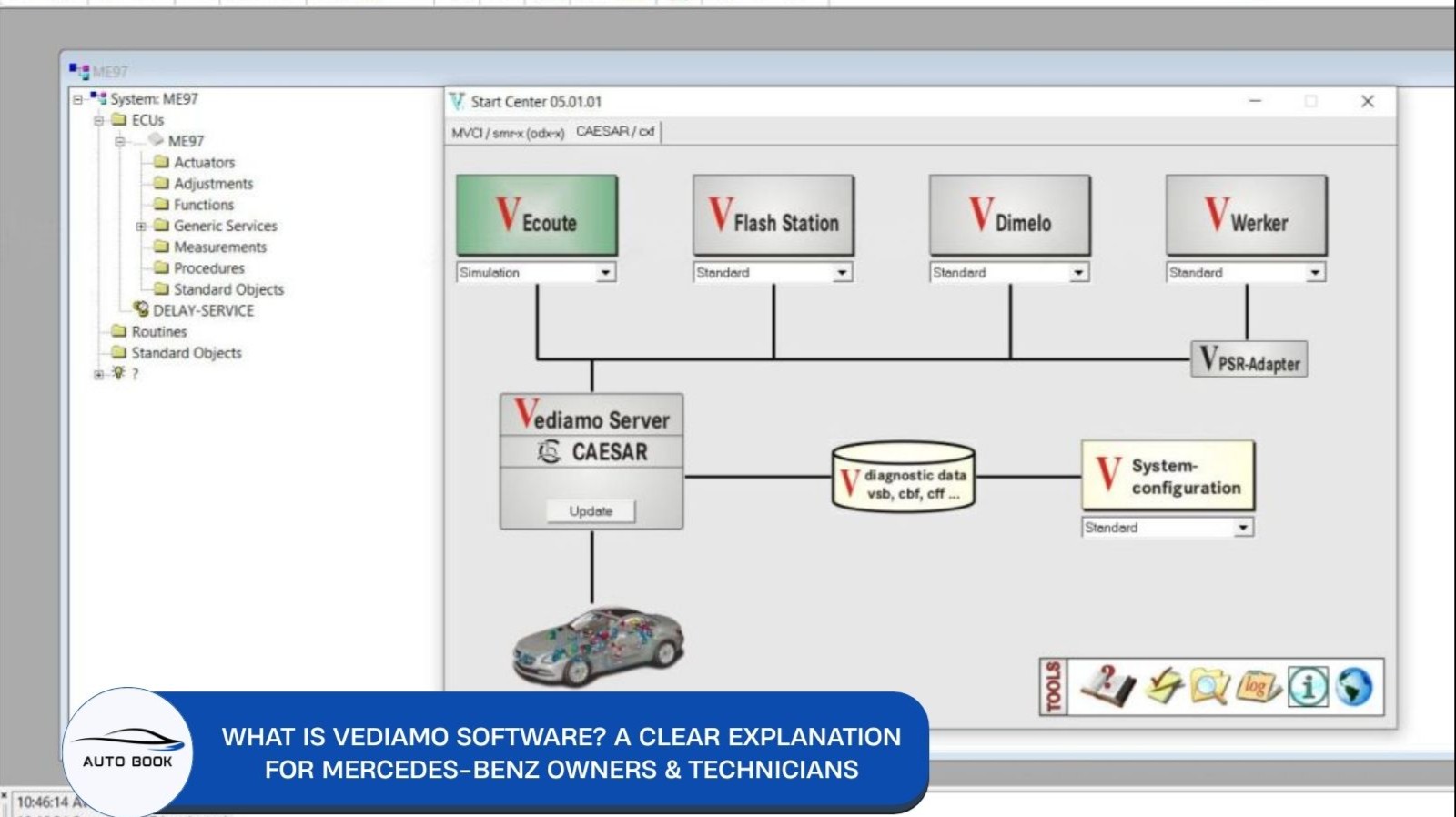
What is Vediamo software? It's a name that circulates constantly in Mercedes-Benz technician communities, usually mentioned like everyone's supposed to already know what it does — yet a clear, straightforward answer is surprisingly hard to find. Let's actually break it down.
What Is Vediamo Software, Exactly?
Vediamo is an engineering-level software originally developed for internal use by Mercedes-Benz plant engineers — not built as a workshop tool for everyday technicians. It's integrated into the CAESAR/DIOGENES process chain, Mercedes-Benz's broader framework for ECU diagnostics and development.
What makes Vediamo particularly significant is its role in Mercedes-Benz's software history: it served as the underlying engineering foundation that later informed both Xentry and DAS, the diagnostic tools most technicians actually use day to day. In other words, Vediamo isn't a side tool — it's closer to the technical root that dealer-level diagnostic software was built from.
While Vediamo's name is historically tied to engine-focused diagnostics, it isn't limited to engine ECUs — it's used across a wide range of vehicle control modules.
Where it fits compared to other tools: Vediamo is an engineering tool, not a workshop diagnostic tool. That distinction matters — it's the difference between software built for guided, everyday repair work (like Xentry) and software built for engineers who need direct, unguided access to how a control unit is actually configured.
What Does Vediamo Software Actually Do?
Once you get past the definition, Vediamo's real value comes down to a handful of core capabilities — all centered on giving direct, low-level access to a vehicle's control units.
- Deep control unit diagnostics — Vediamo can communicate with nearly any individual ECU, reading data and observing internal states that standard diagnostic software doesn't expose. It's less "here's the fault code" and more "here's exactly what this module is doing internally."
- Variant coding and function activation — Vediamo allows adjustment of variant coding, meaning it can enable or disable functions that are physically present in the vehicle's hardware but switched off in software. This is the mechanism behind a lot of feature-unlocking work.
- Broad protocol support — Vediamo communicates over both K-Line and CAN, and supports the full range of established protocols: RTMD+, MBISO, KWFB, KW2000, and UDS. This breadth is part of why it remains relevant for older vehicle platforms that newer tools don't always cover well.
- Not limited to engine ECUs — despite its origins in engine diagnostics, Vediamo works across a wide range of control modules, not just the powertrain.
Taken together, these capabilities are what separate Vediamo from a standard diagnostic scanner: it's not just reporting what's wrong with a vehicle, it's giving direct access to see how a control unit is actually built and configured underneath.
How Does Vediamo Work?
Where a tool like Xentry wraps diagnostic and coding tasks inside guided, step-by-step workflows, Vediamo works differently — it communicates directly with a control unit's internal data and configuration, without that guided layer sitting in between. That's part of what gives it deeper access, and also part of why it demands more from the person using it.
What that direct access requires in practice:
- Additional data files — unlike Xentry, which comes with its diagnostic database largely built in, Vediamo typically requires separate project and ECU-specific data files to work with a given control unit. This is one of the more common setup hurdles technicians run into.
- Manual interpretation — because Vediamo doesn't guide you through a task the way a workshop tool does, understanding what you're looking at (and what a given parameter actually controls) falls more on the user's own knowledge than on the software itself.
- A supporting diagnostic setup — Vediamo is generally used alongside, not instead of, standard diagnostic tools. For day-to-day fault-finding, technicians still rely on tools like Xentry/DAS (see our Mercedes Xentry/DAS_WIS_Starfinder Manual for that side of the workflow); Vediamo comes in specifically for the deeper, module-level work those tools aren't built to handle.
This combination — direct module access, protocol breadth, and minimal built-in guidance — is exactly what makes Vediamo powerful for the right job, and risky for anyone using it without a solid understanding of what each change actually does.
Who Actually Needs Vediamo?
Vediamo isn't a tool most Mercedes-Benz technicians need day to day — and it's worth being clear about who it's actually for.
If your work is standard diagnostics and repair, Xentry/DAS already covers that ground, with a guided workflow that Vediamo intentionally doesn't have. Adding Vediamo wouldn't help there — it would just add risk without a clear benefit. (For that comparison, see our [What Is DTS Monaco?] guide, which covers where Xentry-level tools stop and engineering tools take over.)
Vediamo becomes genuinely useful when:
- Xentry or DAS doesn't support coding for a specific vehicle or model — some older or less common platforms fall outside standard dealer-level software coverage entirely, leaving Vediamo as the practical option for manual coding work.
- You're installing a new or used control unit and need to configure it to match the vehicle it's going into.
- You're doing a retrofit — adding a component or feature that wasn't originally configured for that specific vehicle.
- You need to resolve a configuration issue left over from the factory or a dealer that standard tools can't address.
In practice, this describes engineers and advanced technicians working on specialized coding, retrofits, or module-level tasks — not routine service work. If that's the kind of work you're doing, learning Vediamo properly matters, since the software itself won't guide you through it.
That's exactly the gap the Vediamo Expert Techniques For Mercedes ECU Programming Manual is built to close — a structured way to learn Vediamo's coding and programming workflows instead of piecing it together from scattered forum threads.
Vediamo vs Xentry vs DTS Monaco — Where Does It Fit?
With three names circulating in Mercedes-Benz technician communities, it helps to see them side by side rather than in isolation.
| Criteria | Xentry/DAS | DTS Monaco | Vediamo |
|---|---|---|---|
| Primary purpose | Everyday diagnostics and maintenance | Engineering-level coding, flashing, parameterization | Engineering-level coding and deep module access |
| Typical user | Dealership and workshop technicians | Advanced technicians and engineers | Engineers and advanced technicians, historically plant-level use |
| Guided workflow | Yes — structured, guided diagnostic routines | Partial — more structured than Vediamo, less than Xentry | No — direct access with minimal guidance |
| Safeguards | Built-in guided routines | Limited — no warnings before/after coding changes | Minimal — lacks safeguards found in Xentry |
| Protocol/data support | Standard dealer-level diagnostic coverage | ODX/OTX/UDS, DoIP-capable | K-Line and CAN, broad legacy protocol support (RTMD+, MBISO, KWFB, KW2000, UDS) |
| Vehicle coverage | Broad, but not universal — some older/less common models unsupported | Strong on newer, DoIP-based platforms | Useful where Xentry/DAS coding support is missing, including older models |
The practical takeaway: these three tools aren't interchangeable — they sit at different points on the same spectrum, from guided everyday diagnostics (Xentry/DAS) to structured engineering coding (DTS Monaco) to direct, unguided module-level access (Vediamo). For a full breakdown of how DTS Monaco and Vediamo specifically compare — including which to learn first — see our DTS Monaco vs Vediamo guide.
Is Vediamo Risky to Use?
Yes — more so than the other tools in this comparison, and that's a point worth taking seriously rather than glossing over.
Where the risk comes from:
- No built-in safeguards. Unlike Xentry's guided workflow, Vediamo doesn't warn you before or after a change, and it doesn't stop you from writing an incorrect value to a control unit. The software trusts that you already know what you're doing.
- Direct access means direct consequences. Because Vediamo communicates closely with a module's actual configuration, a mistake isn't just a failed step you can retry — it can leave that control unit misconfigured or unresponsive.
- Minimal guidance means more room for error. Without a structured workflow steering you through a task, it's easier to miss something that a guided tool would have caught automatically.
What reduces that risk in practice:
- Backing up a control unit's existing configuration before making any change
- Understanding exactly what a parameter controls before modifying it — not just following steps without knowing why
- Treating Vediamo as a tool that requires real preparation, not something to experiment with directly on a vehicle you depend on
This is consistent with everything else in this guide: Vediamo's power comes from the same thing that makes it risky — direct, unfiltered access to a control unit. Used with proper preparation, it's genuinely useful for the jobs it's meant for. Used without that preparation, the risk is real. This is exactly why structured learning matters here — the Vediamo Expert Techniques For Mercedes ECU Programming Manual is built around real coding workflows, specifically to close that gap.
![Vediamo Expert Techniques For Mercedes ECU Programming Manual [AI Assistant]](https://czfjbiitepajmlmomcjk.supabase.co/storage/v1/object/public/media/ebooks/1782200971297-tgbvz0-vediamo-unlocked-manual-ai-assitant.jpg)
FAQ
Does Vediamo replace Xentry?
No. Vediamo is an engineering tool used for deep, module-level coding — Xentry/DAS remains the standard for everyday diagnostics and guided workflows. Most technicians who use Vediamo still rely on Xentry/DAS for routine work.
Does Vediamo require a special license?
Vediamo typically requires its own project and ECU-specific data files to work with a given control unit, separate from what Xentry/DAS uses.
What Mercedes-Benz models does Vediamo work with?
Vediamo is particularly relevant for models or configurations that Xentry/DAS doesn't fully support for coding — often older or less common platforms. Coverage depends on the specific vehicle and the data files available.
What's the difference between Vediamo and DTS Monaco?
Both are engineering-level tools, but they're built around different data structures and vehicle eras. See our DTS Monaco vs Vediamo guide for the full comparison.
Should a beginner start with Vediamo?
No. Vediamo has no built-in safeguards and assumes real knowledge of what you're changing and why. It's better suited to advanced technicians and engineers already comfortable with control-unit-level coding, not a starting point for someone new to Mercedes-Benz diagnostics.
Vediamo isn't a mysterious add-on tool — it's the engineering-level software that Mercedes-Benz's own dealer diagnostic tools were built from, offering direct access to control units that guided workshop software simply doesn't provide. That access is genuinely useful for coding, retrofits, and module-level work Xentry/DAS can't reach — but it comes without safeguards, which makes proper preparation non-negotiable.
If Vediamo is the tool your work actually calls for, the Vediamo Expert Techniques For Mercedes ECU Programming Manual is built to give you that preparation — structured coding workflows instead of trial and error on a live vehicle.