How to Use AutoExplain Ebooks with AI Assistant [User Guide]
![How to Use AutoExplain Ebooks with AI Assistant [User Guide]](https://czfjbiitepajmlmomcjk.supabase.co/storage/v1/object/public/media/news/1783651700468-qolwsf-how-to-use-autoexplain-ebooks-with-ai-assistant--user-guide---1-.jpg)
Learning automotive diagnostics, coding, programming, and ECU tuning can be challenging when you're relying on traditional PDF manuals alone. Finding the right chapter, understanding complex technical terms, or translating documentation into your native language often takes more time than the actual learning process.
That's why AutoExplain has transformed the traditional ebook into an intelligent learning platform. Every manual is integrated with an AI Assistant that helps you explain technical concepts, answer questions, summarize chapters, translate content into multiple languages, and guide you through complex procedures—all within your learning experience.
Whether you're a beginner taking your first steps with Xentry, DTS Monaco, WinOLS, ODIS, ISTA, or an experienced technician looking for faster troubleshooting, AutoExplain helps you learn more efficiently. Instead of searching through hundreds of pages, you can simply ask AI and receive clear, context-aware explanations in seconds.
In this guide, we'll walk you through the complete learning journey—from purchasing your first ebook and accessing your library to using AI-powered features, multilingual translation, and practical learning tools that help you master automotive diagnostics and programming with greater confidence.
More Than a PDF Ebook
Unlike traditional PDF ebooks that only provide reading material, every AutoExplain ebook is built on an interactive learning platform with an integrated AI Assistant to help you learn faster and more effectively.
What You Can Do
- Read your ebook online from any device.
- Ask AI questions while reading.
- Get instant explanations for technical content.
- Chat with AI in 25+ popular languages.
- Summarize chapters in seconds.
- Search topics quickly with AI.
- Bookmark important pages for future reference.
With AutoExplain, you're not just reading a manual—you're learning with an AI assistant that helps you understand every step.
How to Use AutoExplain Ebooks with AI Assistant
Step 1 — Purchase Your Ebook
Getting started is simple. Browse the AutoExplain library, choose the ebook that matches your vehicle brand or learning goals, then complete your order through our secure checkout.
After a successful purchase, your ebook will be added to your AutoExplain account automatically.
How to buy: Follow the steps in the image below:
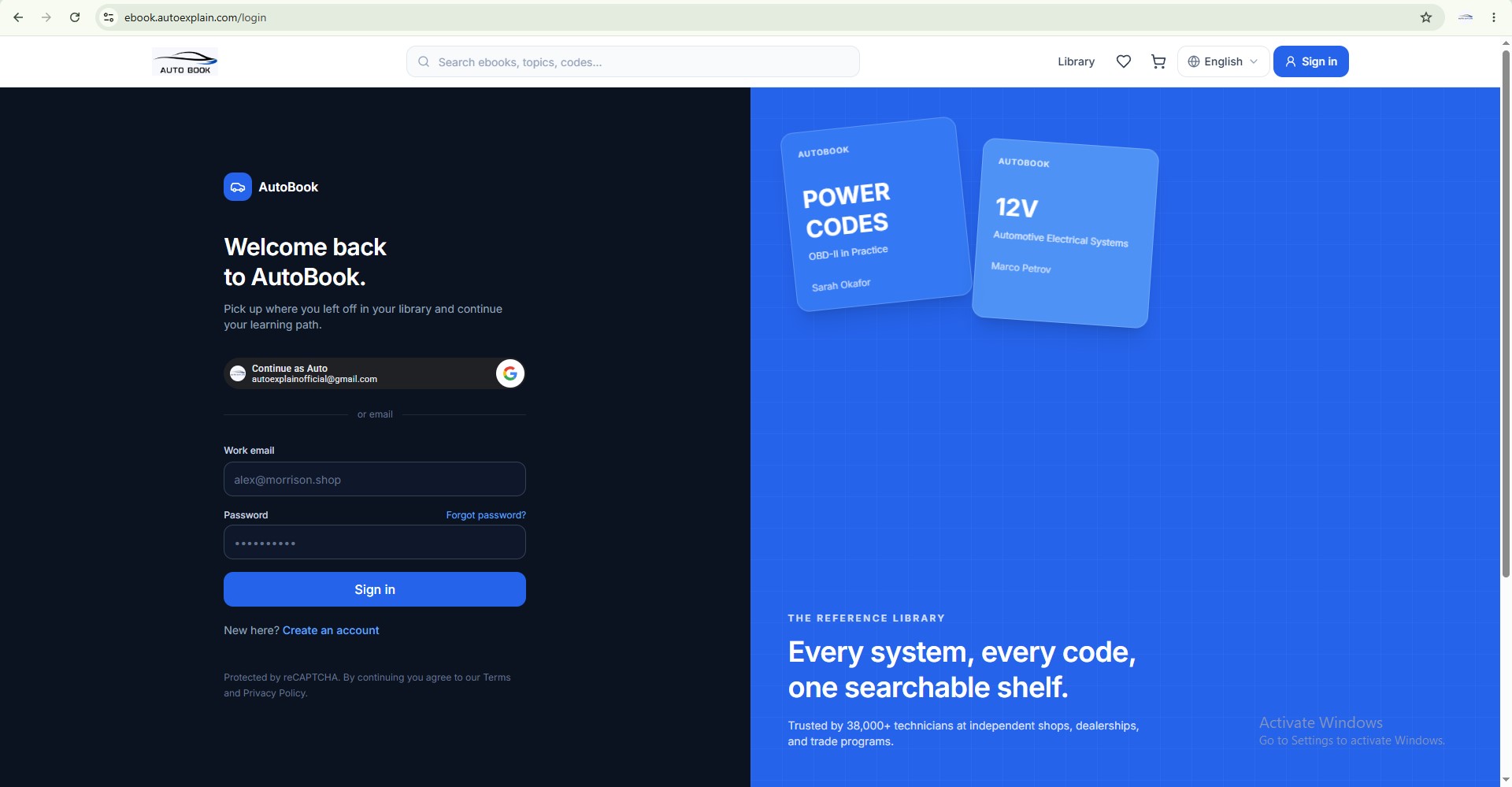
Sign in to your existing AutoExplain account, or create a new account if you don't have one yet
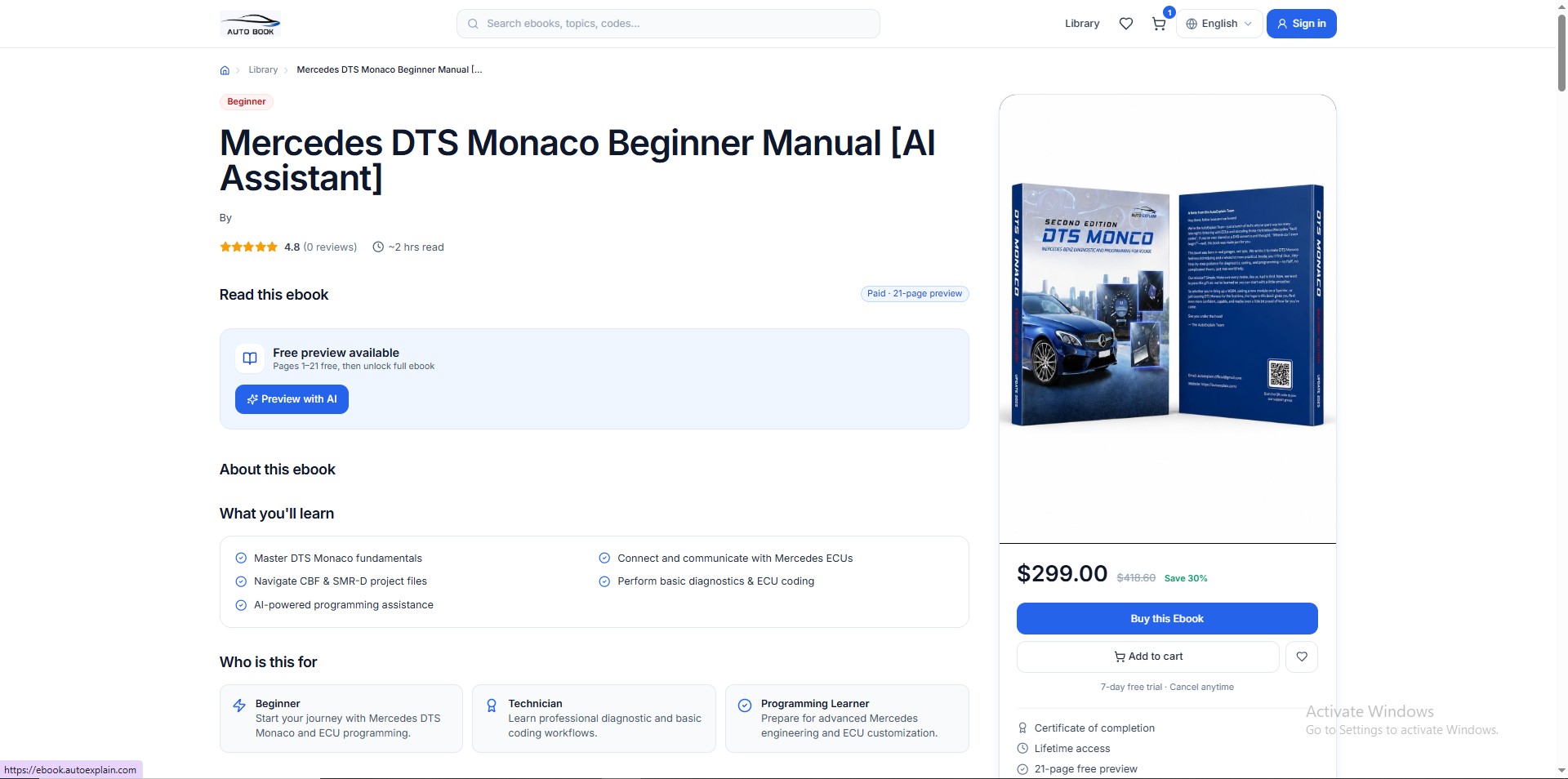
Visit the ebook product page you want to learn and click Buy This Book
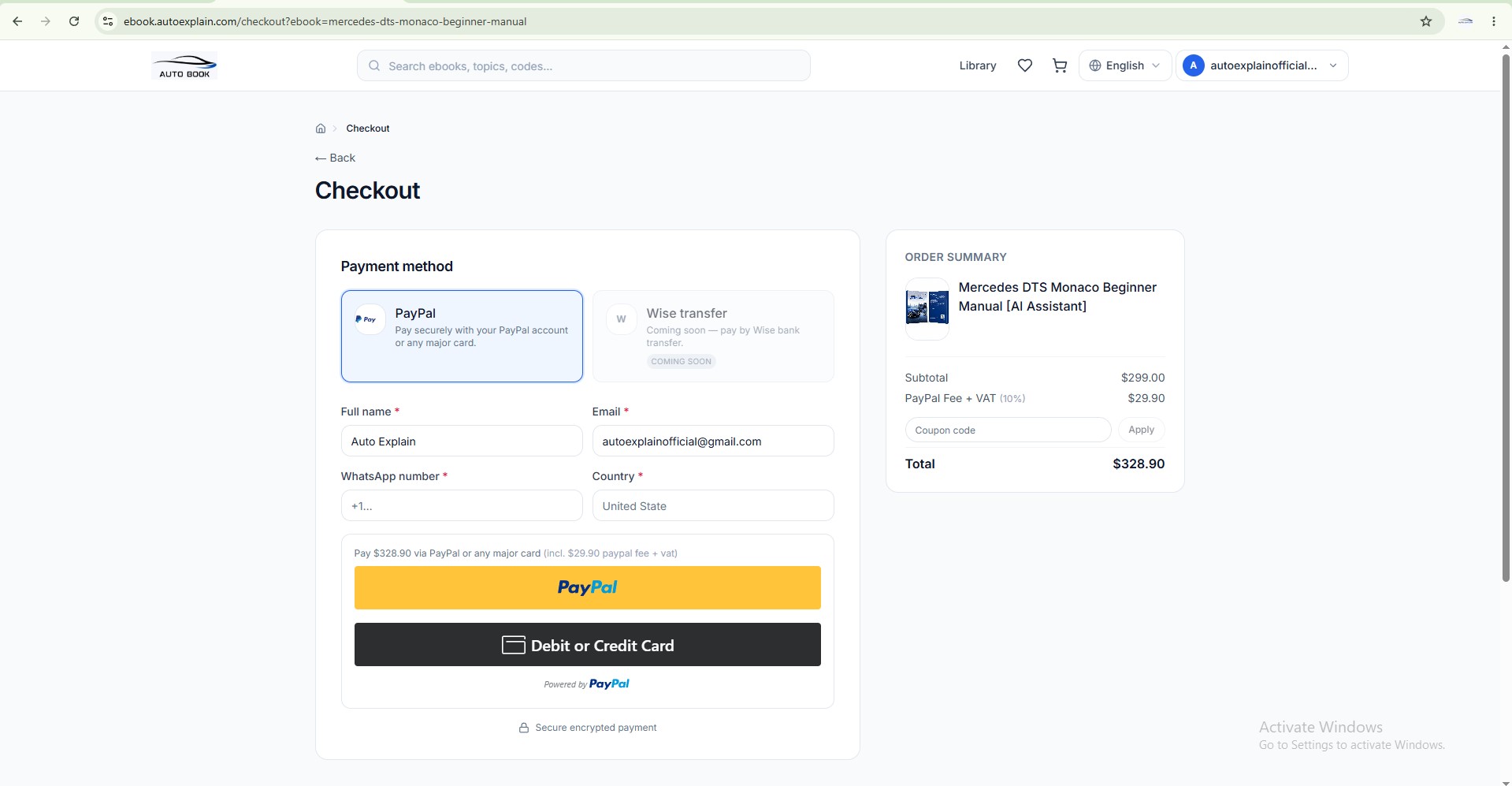
Enter your billing information, review your order details, and choose your preferred payment method to complete the purchase
After Purchase, You'll Receive:
- Instant access to your purchased ebook.
- Online reading through the AutoExplain learning platform.
- Access to the integrated AI Assistant.
- AI Credits equal to 10% of your order value, automatically added to your account after payment.
- Access on desktop, tablet devices (desktop is recommended for the best learning experience, Use of mobile phones is discouraged).
Tip: Sign in with the same account used for your purchase to access all your ebooks and AI features from your personal Library.
Step 2 — Access Your Ebook
After signing in to your AutoExplain account, go to My Book to view all the ebooks you've purchased. Simply select an ebook and click book to start learning.
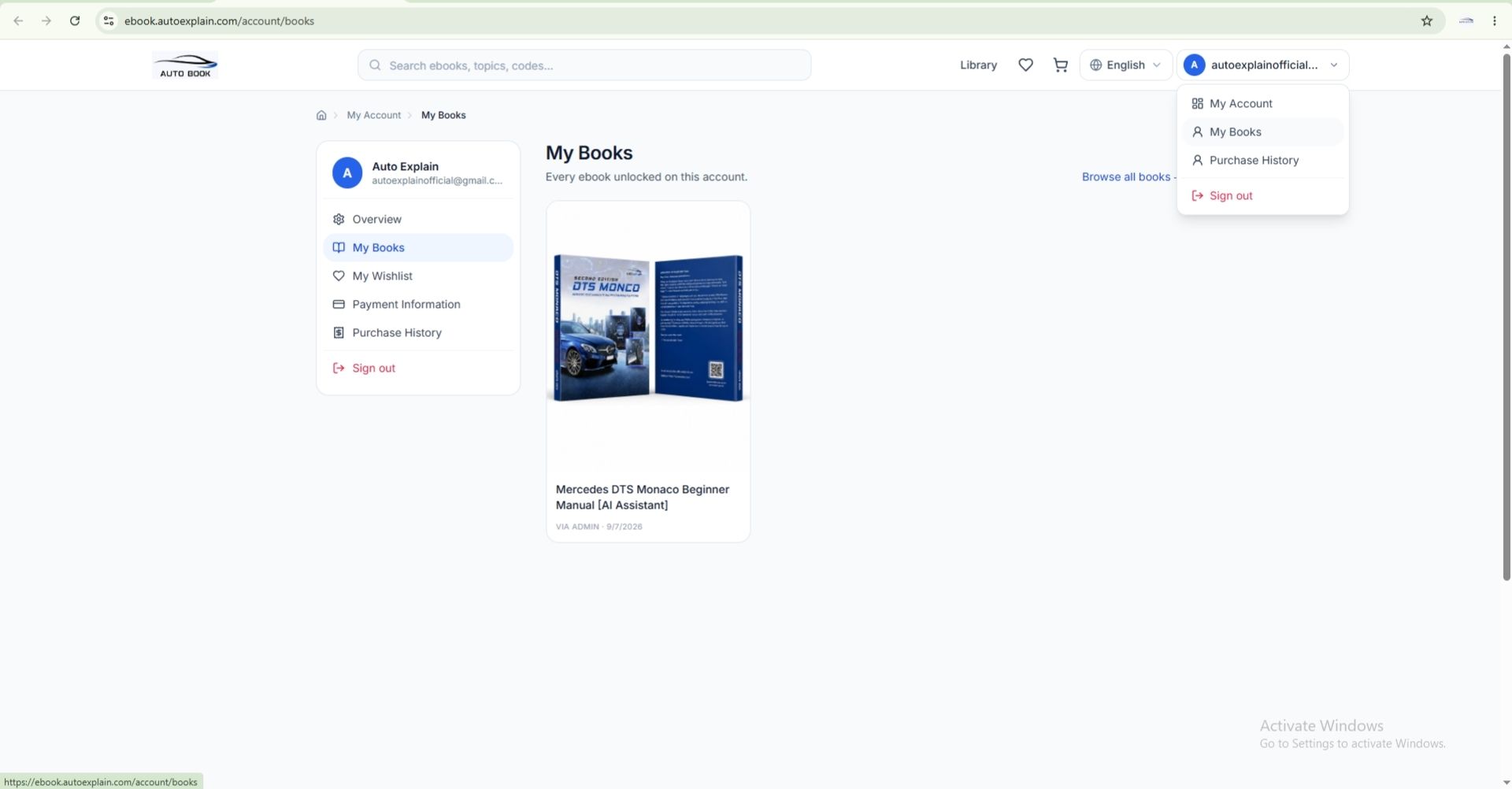
Click My Book >> Access the book you just purchased
In Your Library, You Can:
-
View all your purchased ebooks.
-
Open any ebook with one click.
-
Continue reading from your last position.
-
Access the integrated AI Assistant while reading.
-
Check your remaining AI Credits.
-
Manage your learning anytime from your account.
Tip: Your reading progress is automatically saved, so you can continue where you left off on your next visit.
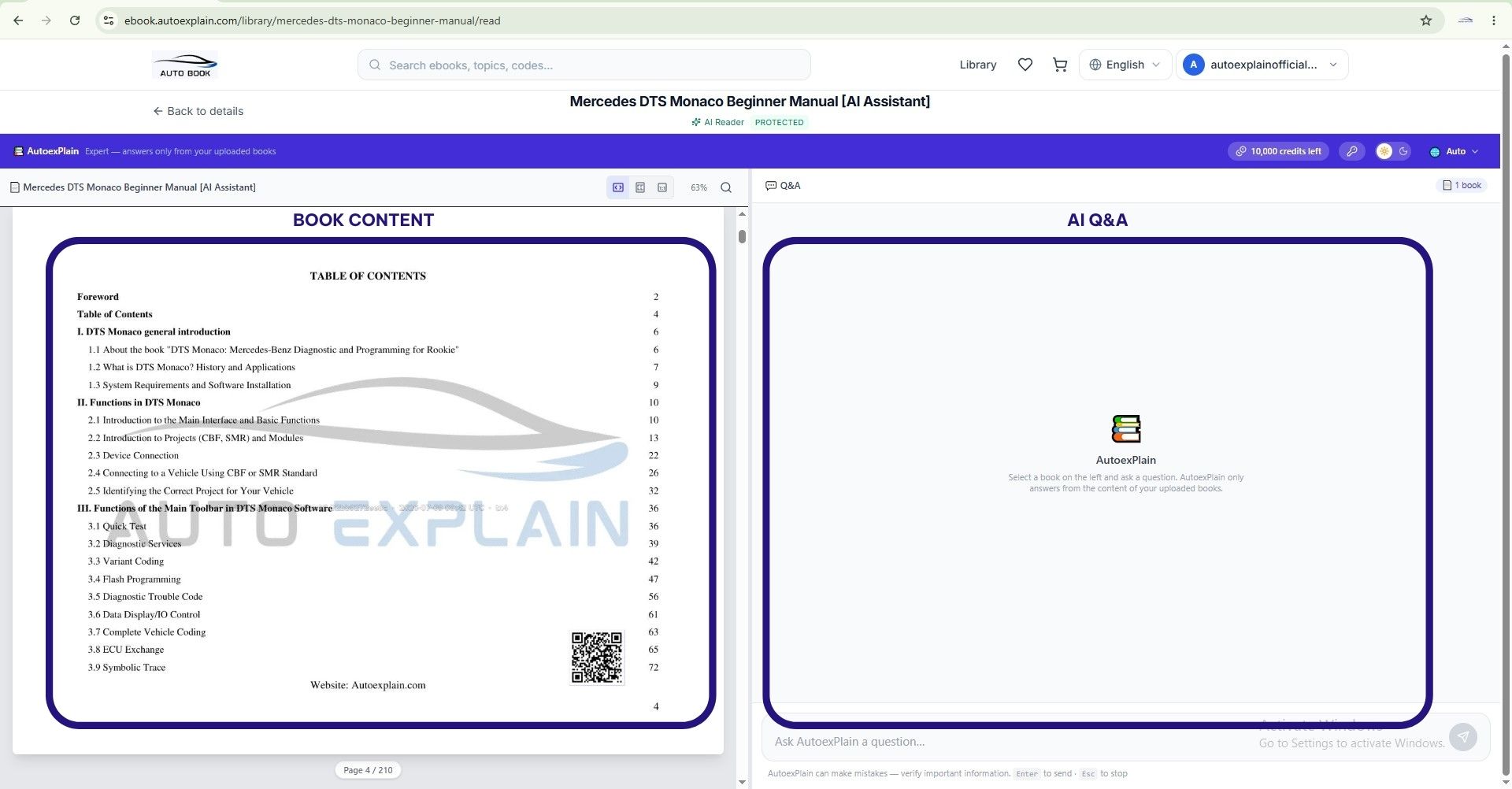
Ebook Reading Interface with AI Support
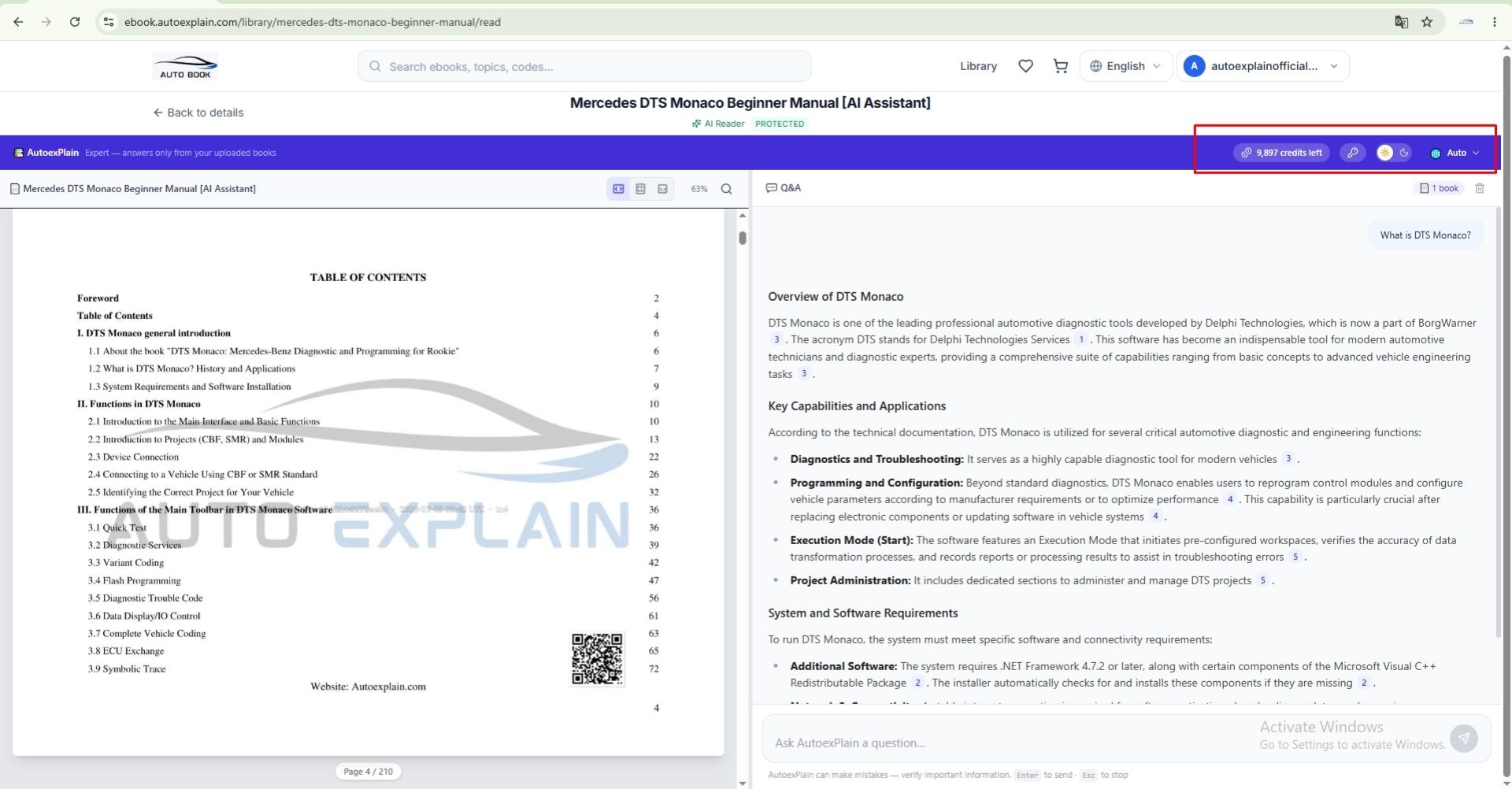
Top navigation bar: AI Credits, Language Settings, Account, and more
Step 3 — Learn with AI Assistant
The AI Assistant is built directly into the reading interface, allowing you to ask questions without leaving your ebook. Whether you need help understanding a concept, explaining a procedure, or finding information quickly, AI is always ready to assist.
What You Can Ask AI:
- Explain technical terms and concepts.
- Answer questions about the current chapter.
- Summarize pages or entire chapters.
- Provide step-by-step explanations.
- Compare different tools, functions, or procedures.
- Respond in 25+ popular languages.
- Help you understand complex automotive topics more easily.
Example Questions:
- What does Variant Coding mean?
- Summarize this chapter.
- Explain this procedure step by step.
- What's the difference between DTS Monaco and Vediamo?
- Explain this in Spanish.
Tip: Ask clear and specific questions to receive more accurate and helpful answers. The AI works best when your questions relate to the ebook content you're reading.
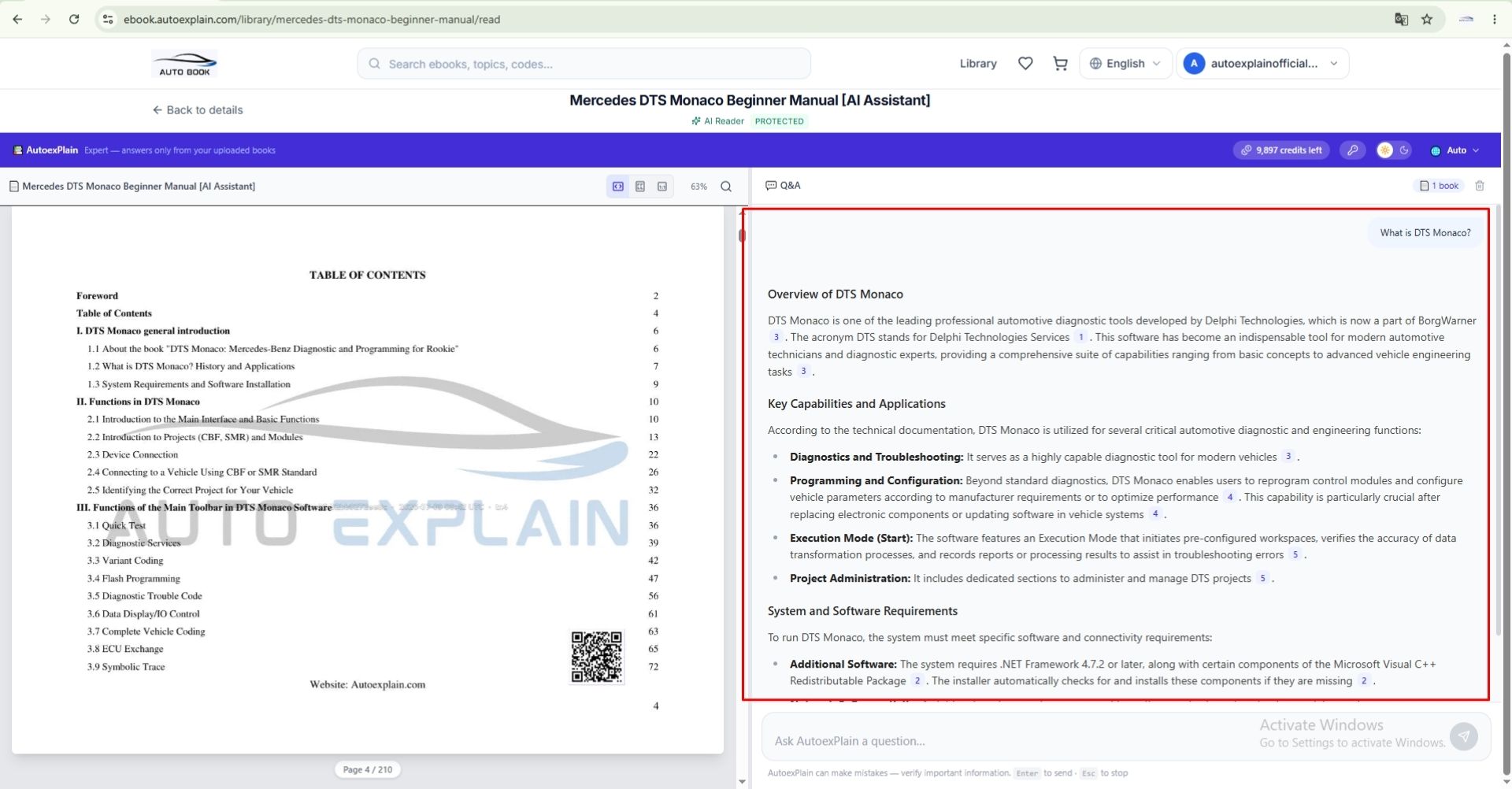
Built-in AI Chat for instant questions and answers
Why Choose AutoExplain Ebooks?
- Real Workshop Knowledge – Written by AutoExplain technicians based on real diagnostic, coding, programming, and ECU tuning projects.
- Practical, Not Just Theory – Learn proven workflows, troubleshooting methods, and hands-on experience from real jobs.
- Built-in AI Assistant – Ask questions, get instant explanations, summarize chapters, and learn more efficiently.
- Support for 25+ Languages – AI answers are available in English, Chinese (Simplified), Chinese (Traditional), Japanese, Korean, French, German, Spanish, Italian, Portuguese, Russian, Dutch, Polish, Swedish, Turkish, Arabic, Hindi, Bengali, Urdu, Thai, Indonesian, Malay, and Filipino.
- Interactive Learning – Read your ebook and chat with AI in the same interface.
- Learn Anytime, Anywhere – Access your ebooks on desktop, tablet, or mobile (desktop recommended for the best experience).
- AI Credits Included – Receive AI Credits equal to 10% of your order value with every ebook purchase.
Frequently Asked Questions
1. How do I access my purchased ebook?
Sign in to your AutoExplain account, go to My Library, and click to open your ebook.
2. Do I need to download the ebook?
No. All ebooks are available through the AutoExplain online reading platform.
To protect our copyrighted content, the platform monitors unauthorized activities such as attempting to copy, capture, or reproduce ebook content. If such activity is detected, a warning will be issued to your account.
Important:
- First violation: Warning issued.
- Second violation: Final warning issued.
- Third violation: Account suspended.
A suspended account will lose access to all purchased ebooks and learning resources associated with that account.
3. Can I use the AI Assistant while reading?
Yes. The AI Assistant is built into the ebook reader, allowing you to ask questions without leaving the page.
4. What can I ask the AI Assistant?
You can ask AI to explain technical concepts, summarize chapters, compare tools, provide step-by-step guidance, and answer questions related to the ebook content.
5. Which languages does the AI Assistant support?
The AI Assistant supports 25+ popular languages, including English, Vietnamese, Chinese (Simplified & Traditional), Japanese, Korean, French, German, Spanish, Italian, Portuguese, Russian, Dutch, Polish, Swedish, Turkish, Arabic, Hindi, Bengali, Urdu, Thai, Indonesian, Malay, and Filipino.
6. How do AI Credits work?
Each AI request uses AI Credits. Every ebook purchase includes AI Credits equal to 10% of your order value, automatically added to your account after payment.
7. Where can I check my remaining AI Credits?
Your remaining AI Credits are displayed in the top navigation bar of the ebook reader and your account dashboard.
8. Can I access my ebook on multiple devices?
Yes. You can access your ebooks from desktop, tablet, or mobile using the same AutoExplain account. For the best experience, we recommend using a desktop or laptop.
9. Can I use the AI Assistant without opening the ebook?
No. The AI Assistant is designed to work alongside the ebook, providing context-aware support while you read and learn.
We hope this guide helps you get the most out of your ebook and AI-powered learning experience. With professional manuals, real workshop knowledge, and a built-in AI Assistant, you'll be able to learn automotive diagnostics, coding, programming, and ECU tuning more efficiently than ever.
If you have any questions or need assistance, our support team is here to help.
Contact Us
-
WhatsApp: +1 (936) 289-6695
-
Email: [email protected]
We're always happy to assist you with your learning journey.