AutoExplain BMW Coding Advanced Vol. 2: 100 Feature Coding & Customization Guide
Take your BMW coding knowledge to the next level with AutoExplain BMW Coding Advanced Vol. 2: 100 Feature Coding & Customization Guide.
Designed as an advanced technical reference, this guide explores a wide range of BMW coding, vehicle configuration, retrofit, ECU customization, comfort functions, infotainment settings, lighting behavior, instrument-cluster options, and other electronic features.
The book is structured to help readers understand not only how a coding change is performed, but also why a particular configuration may be available, which vehicle systems may be involved, and what should be checked before and after coding.
With practical explanations, coding workflows, parameter references, and feature-specific examples, this volume is intended as a reference for experienced automotive technicians, coding professionals, workshops, and knowledgeable BMW enthusiasts.
Book Overview BMW Coding Advanced Vol. 2
AutoExplain BMW Coding Advanced Vol. 2 focuses on advanced vehicle configuration and feature customization.
The guide covers approximately 100 coding and configuration examples, organized into major technical areas including:
-
VO coding and vehicle configuration
-
FDL coding concepts
-
Hardware retrofit and configuration
-
Comfort and convenience functions
-
Infotainment and iDrive customization
-
Instrument-cluster configuration
-
Head-up display settings
-
Lighting configuration
-
Tailgate and remote-control functions
-
Driver-assistance related configuration
-
Audio and multimedia settings
-
Vehicle behavior and convenience settings
-
Selected service and diagnostic configurations
The examples are organized by system and function to make the book easier to use as a long-term technical reference.
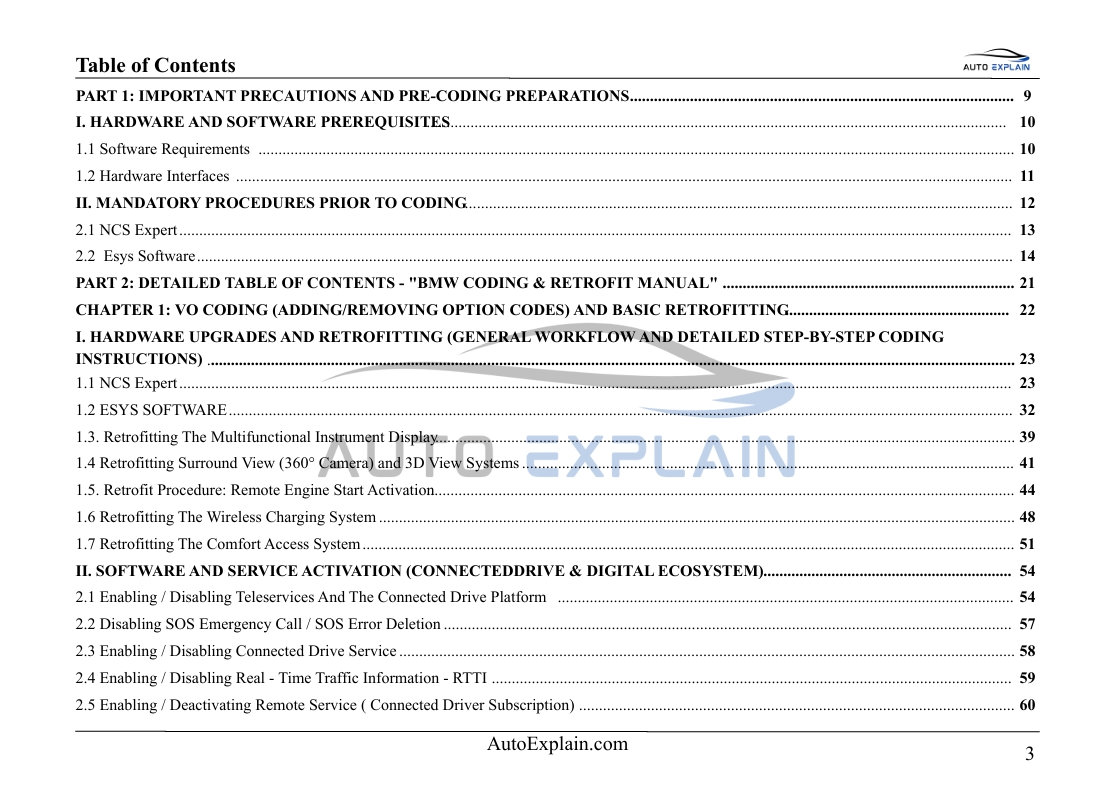
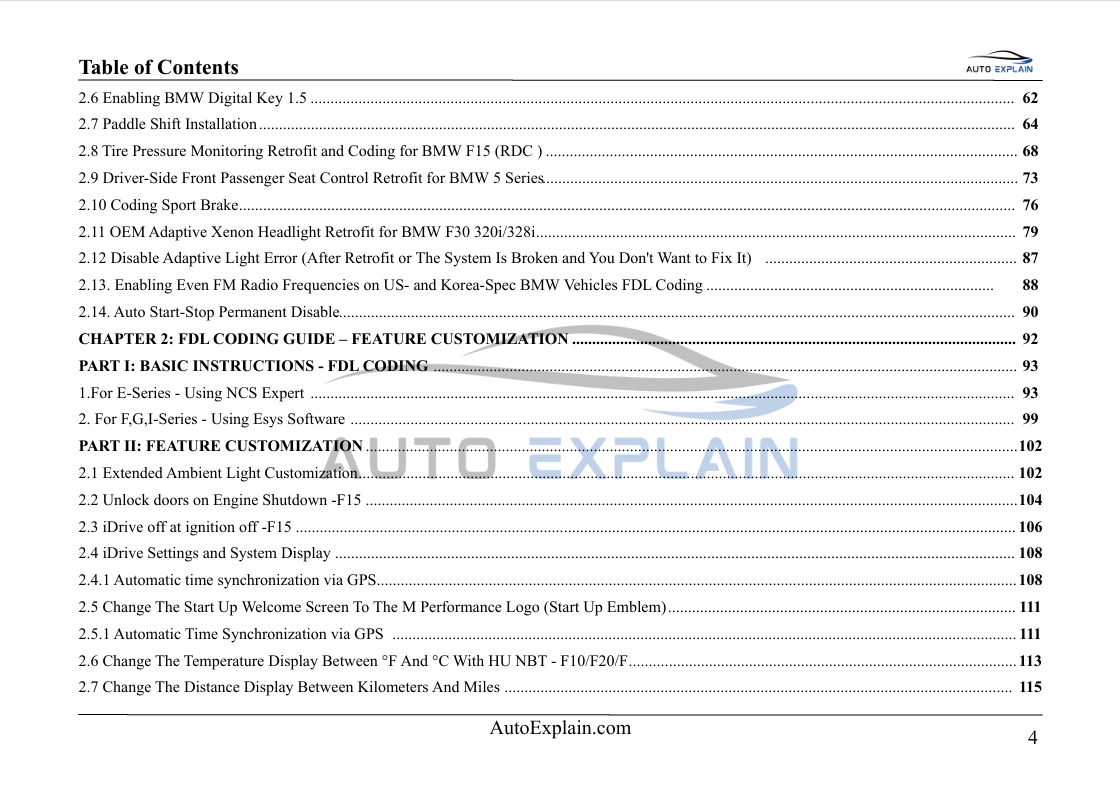
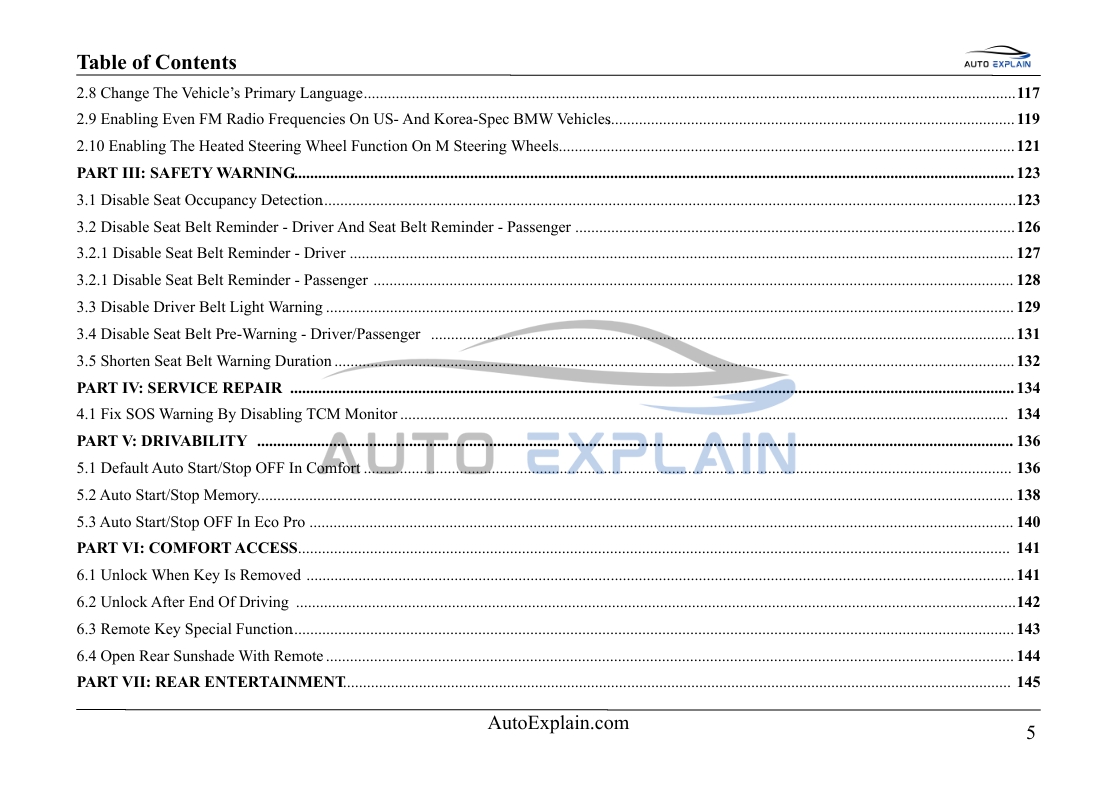
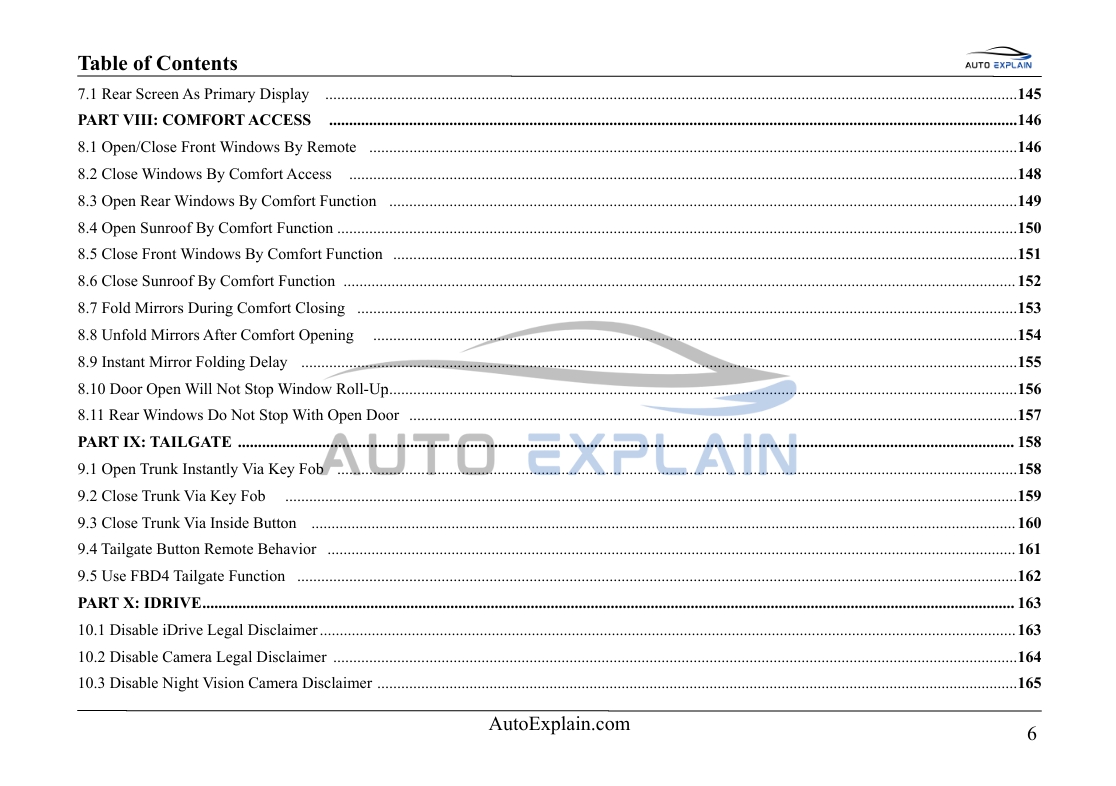
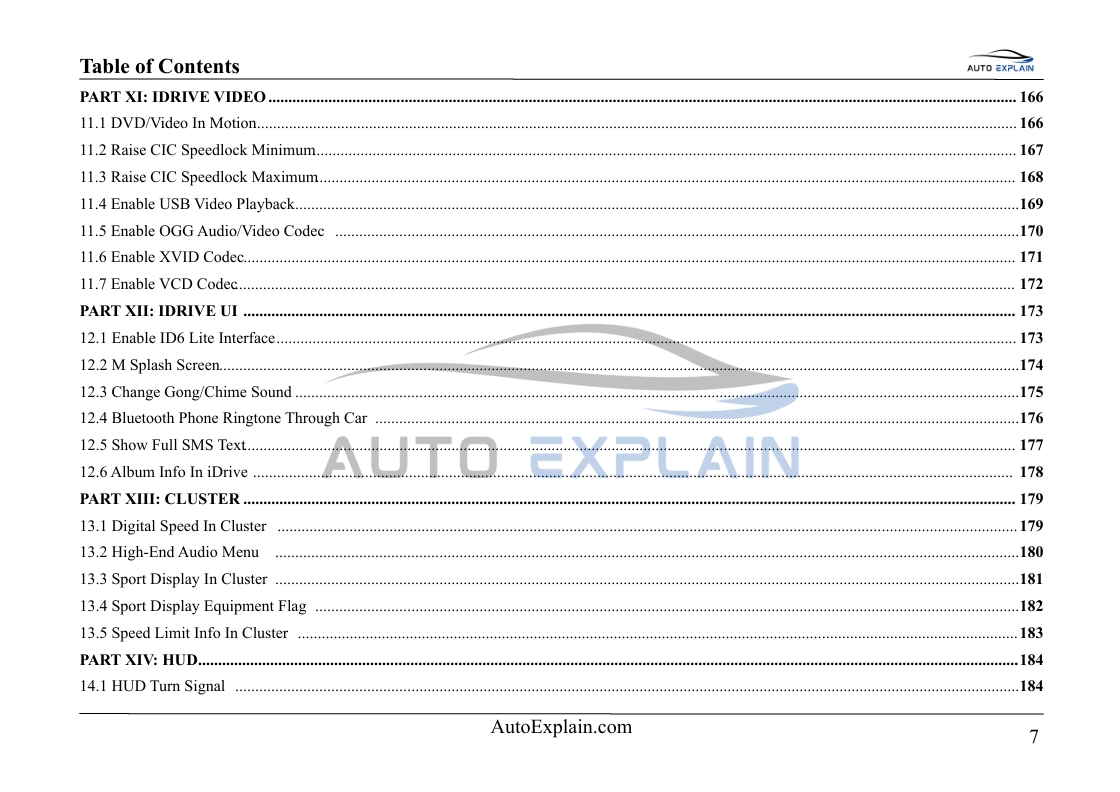
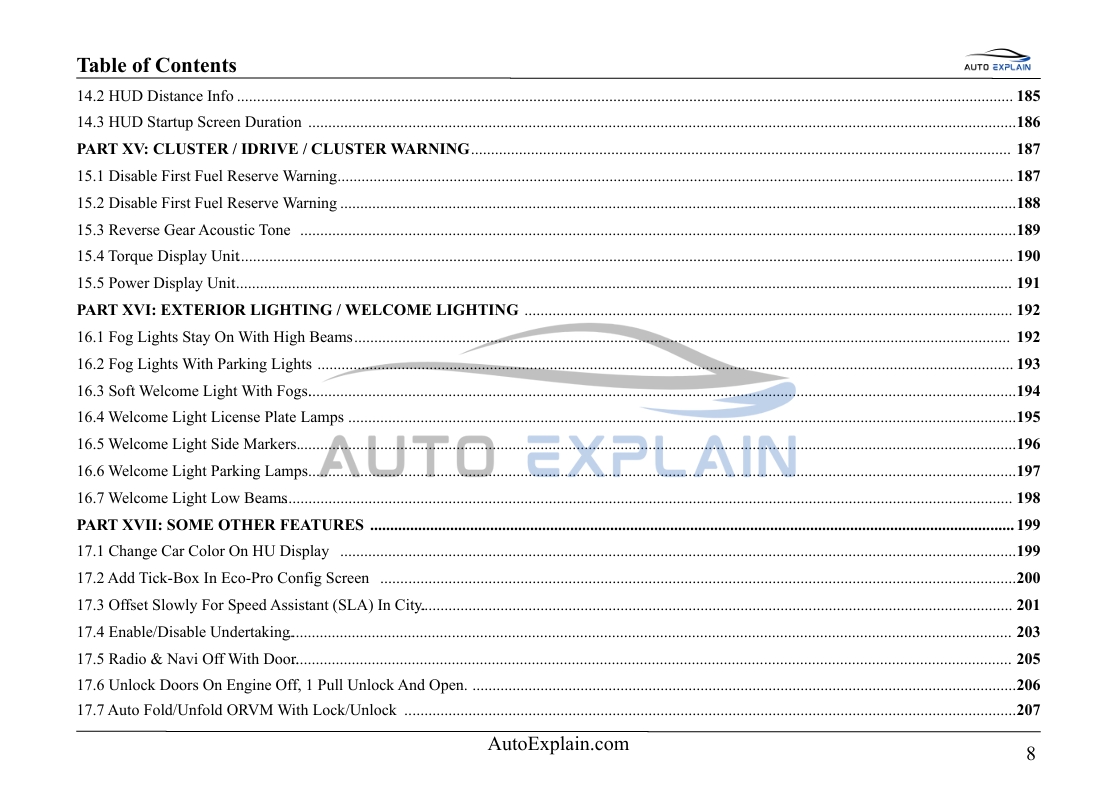
Table of content BIM Coding Advanced Vol.2: Unlock 100 Hidden Features
What You'll Learn
After working through the guide, readers can develop an understanding of:
-
BMW vehicle coding concepts
-
The difference between VO coding and FDL coding
-
Vehicle Order and configuration data
-
ECU and control-module relationships
-
Coding parameter structures
-
Hardware-dependent versus software-dependent functions
-
Retrofit-related coding concepts
-
Comfort and convenience configuration
-
Infotainment customization
-
Instrument-cluster and HUD configuration
-
Lighting-related configuration
-
Remote and tailgate functions
-
Troubleshooting after coding
-
Restoring original configuration
-
Important considerations before modifying vehicle settings
Part 1 — Coding Preparation
Before working with individual coding functions, the guide explains important preparation procedures.
Topics include:
-
Hardware and interface requirements
-
Software and data considerations
-
Vehicle identification
-
ECU identification
-
Vehicle configuration
-
Communication stability
-
Battery and power-supply considerations
-
Original coding backup
-
Compatibility checks
-
Pre-coding procedures
The objective is to help readers establish a reliable workflow before making configuration changes.
Part 2 — BMW Coding & Retrofit
This section introduces practical approaches to vehicle configuration and selected retrofit-related workflows.
VO Coding and Vehicle Configuration
Learn the concepts behind:
-
Vehicle Order configuration
-
Option-code changes
-
Adding or removing configuration data
-
Coding affected control modules
-
Verifying configuration changes
-
Restoring original configuration
The guide also explains how vehicle configuration can interact with installed hardware and control-module capabilities.
Hardware Retrofit Coding
Selected retrofit examples cover areas such as:
-
Multifunction instrument displays
-
Surround-view and camera-related systems
-
Comfort access equipment
-
Wireless charging
-
Paddle-shift configurations
-
Tire-pressure monitoring systems
-
Seating-related equipment
-
Brake-system configuration
-
Adaptive lighting equipment
Availability and coding requirements can vary depending on vehicle generation, installed equipment, control modules, software version, and market specification.
Part 3 — Feature Customization
The core of the book focuses on approximately 100 feature customization examples.
Rather than treating coding as a simple collection of parameter changes, the guide explains each function through a structured technical approach.
Typical feature sections include:
Function Overview
An explanation of the feature and the vehicle behavior it controls.
Application
Information about relevant vehicle generations, equipment, control modules, and compatibility considerations where applicable.
Coding Method
An overview of the applicable coding approach and workflow.
Coding Parameters
Identification of the relevant configuration parameters and their possible values where supported by the example.
Coding Procedure
A structured workflow explaining the sequence of actions required to review and modify the applicable configuration.
Expected Result
An explanation of the intended vehicle behavior following a successful configuration change.
Verification
Recommended checks for confirming that the configuration has been applied as expected.
Important Notes
Considerations related to vehicle model, ECU version, software/data version, installed equipment, and regional configuration.
Comfort & Convenience Customization
Explore selected configuration examples related to everyday vehicle functions, including:
-
Remote window operation
-
Comfort opening and closing
-
Sunroof behavior
-
Mirror folding and unfolding
-
Door-unlock behavior
-
Remote-control functions
-
Tailgate operation
-
Comfort-access related settings
These examples demonstrate how electronic configuration can affect convenience features across compatible vehicle systems.
Infotainment & iDrive Configuration
The guide includes selected examples involving infotainment and display behavior, such as:
-
Display configuration
-
Legal-disclaimer screen settings
-
Multimedia functionality
-
Audio and video configuration concepts
-
Interface customization
-
Bluetooth-related settings
-
Display information
-
Selected interface and menu options
The availability of these functions depends on the installed infotainment system, software version, vehicle configuration, and supporting hardware.
Instrument Cluster & Head-Up Display
Selected examples cover configuration concepts related to:
-
Digital speed display
-
Sport-oriented display information
-
Speed-limit information
-
Fuel-related warnings
-
Head-up display information
-
Turn-signal information
-
Display timing and behavior
-
Selected instrument-cluster options
The guide explains the relationship between configuration parameters and the information presented to the driver.
Lighting Configuration
The book also covers selected lighting-related configuration examples, including:
-
Welcome-light behavior
-
Parking-light behavior
-
Fog-light configuration
-
Exterior lighting combinations
-
Side-marker behavior
-
Lighting behavior during vehicle unlocking
Because lighting configuration can interact with regional requirements and vehicle equipment, readers should verify applicable regulations and vehicle specifications before making changes.
Tailgate & Remote Functions
Selected examples explore configuration of:
-
Remote tailgate operation
-
Tailgate closing functions
-
Interior-button behavior
-
Remote-control behavior
-
Convenience functions related to vehicle access
Vehicle Behavior & Convenience Settings
Additional examples cover selected configuration areas such as:
-
Start/Stop behavior
-
Vehicle-unlock behavior
-
Comfort functions
-
Selected warning configurations
-
Display and notification behavior
-
Eco-oriented configuration options
-
Other electronic convenience settings
The guide emphasizes that available parameters can differ between vehicle generations and software configurations.
Technical Reference & Troubleshooting
Advanced coding requires more than knowing which parameter to change.
The guide therefore introduces practical troubleshooting concepts, including:
-
Understanding ECU relationships
-
Identifying the correct control module
-
Locating relevant coding data
-
Recognizing parameter differences
-
Handling unsuccessful coding attempts
-
Checking vehicle behavior after coding
-
Reviewing errors after configuration changes
-
Restoring original coding
-
Understanding when a coding change may require additional hardware or programming
Practical Coding Workflow
A consistent workflow is emphasized throughout the guide:
Identify → Prepare → Read → Backup → Modify → Code → Verify → Restore if Required
This approach helps readers understand the importance of documenting the original configuration before making changes.
Safety & Important Configuration Notes
Some vehicle functions discussed in coding literature can affect warnings, driver information, convenience behavior, lighting, or other vehicle-system settings.
The guide therefore encourages readers to consider:
-
Vehicle safety
-
Applicable regulations
-
Manufacturer requirements
-
Vehicle documentation
-
Hardware compatibility
-
Software compatibility
-
Regional requirements
-
Original configuration backup
Coding capability does not necessarily mean that a particular configuration is appropriate for every vehicle or situation.
Who Is This Guide For?
This book is intended for:
-
Automotive technicians
-
Vehicle diagnostic professionals
-
Coding specialists
-
Automotive workshops
-
Experienced automotive enthusiasts
-
Readers with prior knowledge of vehicle electronics and diagnostic workflows
Because this is an Advanced Vol. 2 guide, readers are expected to have a basic understanding of automotive diagnostics, electronic control modules, and vehicle coding concepts.
Why Choose AutoExplain BMW Coding Advanced Vol. 2?
-
Covers approximately 100 coding and configuration examples
-
Focuses on advanced BMW coding concepts
-
Includes VO and FDL coding concepts
-
Covers selected retrofit workflows
-
Organized by vehicle system and feature category
-
Provides structured feature-specific explanations
-
Includes compatibility and verification considerations
-
Useful as a practical technical reference
-
Designed for experienced users and advanced learners
Important Information
This is an independent third-party educational guide created by AutoExplain.
AutoExplain is not affiliated with, sponsored by, endorsed by, or officially associated with BMW AG or any BMW trademark owner. BMW and related vehicle/model names are referenced solely to identify the vehicles and systems discussed in this educational material.
The information, examples, screenshots, and procedures in this guide are provided for educational and reference purposes. Software functions, vehicle systems, coding options, retrofit procedures, and compatibility may vary according to vehicle model, model year, ECU version, installed equipment, software/data version, vehicle configuration, and market.
Some functions described in the book may require specific hardware, software, vehicle equipment, or system configurations and may not be available on every vehicle.
Any diagnostic, coding, retrofit, or programming activity should be performed only by appropriately qualified persons and in accordance with applicable laws, manufacturer requirements, vehicle documentation, and appropriate safety procedures.
Incorrect configuration or programming may affect vehicle operation, system functionality, diagnostics, warnings, or regulatory compliance. Readers should verify compatibility and applicable requirements before making changes to a vehicle.
Support from AutoExplain
Customers purchasing this guide from AutoExplain receive access to available product support and educational resources related to the material covered in the book.
- WhatsApp Support: +1 (936) 289-6695
- Email: [email protected]